Authorization
SignalWire REST APIs support two authentication methods: Basic Authentication and Bearer Authentication. Each endpoint specifies which method it accepts.
Basic Authentication
Basic Authentication is the standard method for authenticating with SignalWire REST APIs, using your Project ID and API Token.
How it works
Include an Authorization header with each request:
Authorization: Basic <credentials>
To build the credentials string:
- Join your Project ID and API Token with a colon:
ProjectID:APIToken - Base64 encode the result
Example
Given the Project ID a1b2c3d4-e5f6-7890-abcd-ef1234567890 and API Token 4tjCGnmAeQ0hwFmFDhwfgww880X2lsnuR60VMyasGR3hFpSyvu:
# In the format username:password
a1b2c3d4-e5f6-7890-abcd-ef1234567890:4tjCGnmAeQ0hwFmFDhwfgww880X2lsnuR60VMyasGR3hFpSyvu

# Base64 encoded:
YTFiMmMzZDQtZTVmNi03ODkwLWFiY2QtZWYxMjM0NTY3ODkwOjR0akNHbm1BZVEwaHdGbUZEaHdmZ3d3ODgwWDJsc251UjYwVk15YXNHUjNoRnBTeXZ1

# Full header:
Authorization: Basic YTFiMmMzZDQtZTVmNi03ODkwLWFiY2QtZWYxMjM0NTY3ODkwOjR0akNHbm1BZVEwaHdGbUZEaHdmZ3d3ODgwWDJsc251UjYwVk15YXNHUjNoRnBTeXZ1
Finding your credentials
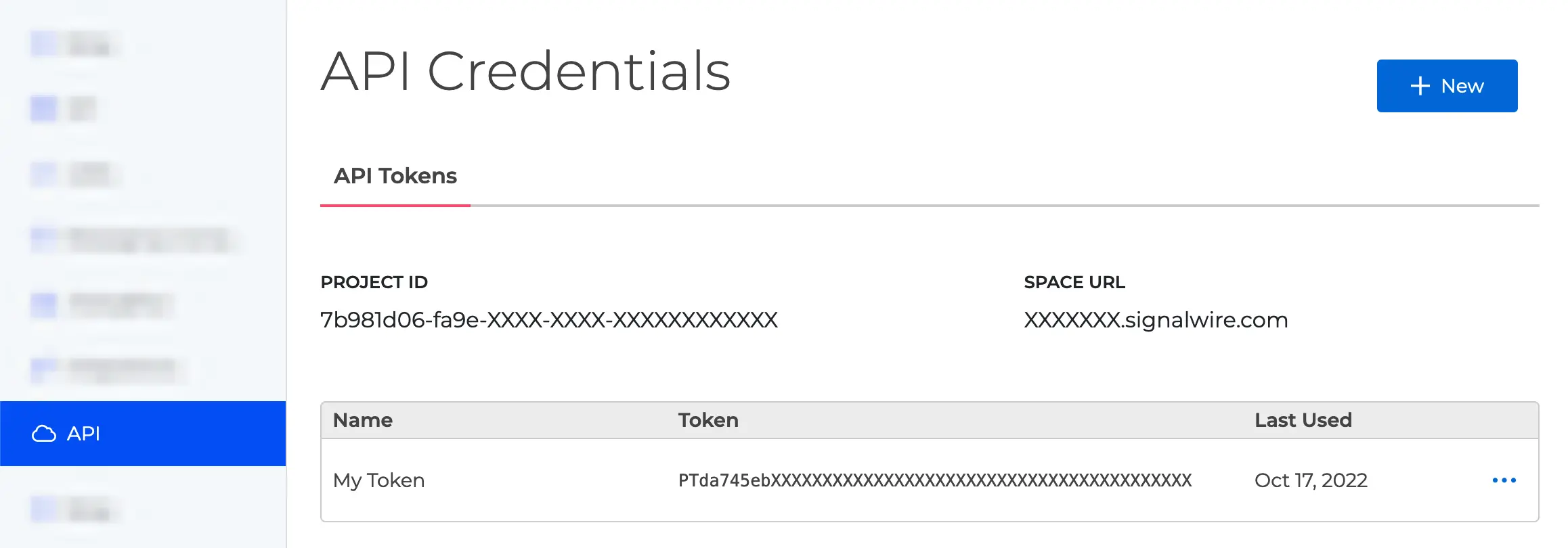
Your Project ID and API Tokens are available in the SignalWire Dashboard.
API token scopes
Tokens can be scoped to limit API access. Select scopes when creating or editing a token in the Dashboard.
Getting a 401 Unauthorized?
Check that your token has the required scope.
Manage scopes in the SignalWire Dashboard.
cURL examples
# With base64-encoded credentials
curl https://{Your_Space_Name}.signalwire.com/api/calling/calls \
     -H 'Authorization: Basic YTFiMmMzZDQtZTVmNi03ODkwLWFiY2QtZWYxMjM0NTY3ODkwOlBUOWE4YjdjNmQ1ZTRmM2EyYjFj'

# Encoded inline using the Bash pipe operator
curl https://{Your_Space_Name}.signalwire.com/api/calling/calls \
    -H "Authorization: Basic $(echo -n "YourProjectId:YourApiToken" | base64)"

# Encoded inline with cURL's -u flag
curl https://{Your_Space_Name}.signalwire.com/api/calling/calls \
    -u YourProjectId:YourApiToken
Bearer Authentication
Bearer Authentication passes a token in the Authorization header. Use this for client-side calls where you can't safely expose your API credentials.
How it works
Include the token in an Authorization header:
Authorization: Bearer <token>
Bearer tokens are short-lived and scoped to specific permissions, unlike API credentials which don't expire.
Token types
Subscriber Access Token (SAT)
SATs authenticate end users in Fabric applications, letting client apps make API calls on behalf of a subscriber.
How to obtain: Call the Create Subscriber Token endpoint using Basic Auth.
curl -X POST https://your-space.signalwire.com/api/fabric/subscribers/tokens \
     -H 'Authorization: Basic <Base64(YourProjectID:YourAPIToken)>' \
     -H 'Content-Type: application/json' \
     -d '{
       "reference": "user@example.com",
       "expire_at": 1725513600
     }'
Use case: Client apps connecting to Fabric services, such as listing Fabric Addresses.
Guest Token
Guest Tokens grant limited, temporary access without full subscriber privileges. They're created from an existing SAT and restricted to specific Fabric addresses.
How to obtain: Call the Create Subscriber Guest Token endpoint using a SAT.
curl -X POST https://your-space.signalwire.com/api/fabric/guests/tokens \
     -H 'Authorization: Bearer <subscriber_access_token>' \
     -H 'Content-Type: application/json' \
     -d '{
       "allowed_addresses": ["c22d24f6-5a26-4f53-8008-b29530339efa"]
     }'
Use case: Click-to-call widgets, guest access, or anywhere you need temporary access.
Token lifecycle
Bearer tokens expire. Once they do, requests return 401 Unauthorized and you'll need a fresh token.
To keep a session alive without re-authenticating, call the Refresh Subscriber Token endpoint before expiration.
cURL example
curl https://your-space.signalwire.com/api/fabric/addresses \
     -H 'Authorization: Bearer <token>'
With a SAT token:
curl https://your-space.signalwire.com/api/fabric/addresses \
     -H 'Authorization: Bearer eyJhbGciOiJkaXIiLCJlbmMiOiJBMjU2R0NNIiwiY2giOiJwdWMuc2lnbmFsd2lyZS5jb20iLCJ0eXAiOiJTQVQifQ...'
Security best practices
- Keep API credentials server-side. Use Bearer tokens for client applications.
- Set short token lifetimes to reduce risk if a token leaks.
- Scope tokens narrowly—only grant what's needed.
- Always use HTTPS. Plain HTTP requests will fail.
- Rotate API tokens periodically from your Dashboard.